HDMI to DVI Explained: Cables, Adapters, and When You Need Them
Posted by sf cable
Filed in Technology 49 views
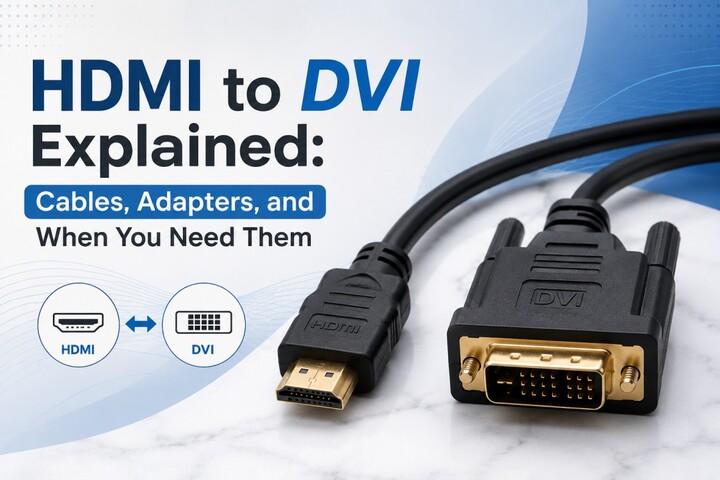
If you've ever tried to connect a newer laptop or streaming device to an older monitor, you've probably run into a frustrating mismatch: one device has an HDMI port, and the other only has DVI. While these two standards look completely different, they're actually more closely related than most people realize, which is exactly why HDMI to DVI cables and adapters exist and work reliably.
This guide breaks down what HDMI and DVI actually are, the different types of HDMI you'll encounter, and how to choose between an HDMI to DVI cable and an adapter for your specific setup.
What Is HDMI?
HDMI, or High-Definition Multimedia Interface, is the standard connector found on most modern TVs, monitors, laptops, gaming consoles, and streaming devices. Unlike older standards, HDMI carries both video and audio over a single cable, which is part of why it became the dominant connection type for home entertainment and computer displays alike.
Beyond just being a single connector type, HDMI has evolved through several versions over the years, each offering improvements in resolution support, refresh rate, and bandwidth. Newer versions also introduced features like support for 4K and 8K resolution, HDR, and enhanced audio formats.
What Is DVI?
DVI, or Digital Visual Interface, predates HDMI and was originally designed to carry high-quality digital video between computers and monitors. Unlike HDMI, standard DVI does not carry audio, only video. This is one of the most important distinctions to understand when working with HDMI to DVI adapters or cables, since audio has to be handled separately when converting between the two standards.
DVI was extremely common on computer monitors and graphics cards for many years, and while it has largely been phased out in favor of HDMI and DisplayPort on new hardware, plenty of older monitors, projectors, and graphics cards still rely on it.
Types of HDMI Connectors
Before getting into HDMI to DVI conversion specifically, it helps to understand the different types of HDMI connectors you might encounter, since not all HDMI ports look the same.
- Standard HDMI (Type A): The full-size connector found on TVs, monitors, desktop computers, and most home entertainment equipment.
- Mini HDMI (Type C): A smaller connector often found on DSLR cameras, tablets, and some older compact laptops.
- Micro HDMI (Type D): An even smaller connector used on some smartphones, tablets, and compact cameras.
When working with smaller devices, you may also come across a micro USB to HDMI cable, micro HDMI cord, or HDMI to micro USB connection. It is important to distinguish Micro HDMI from Micro USB, as they are different connectors designed for different purposes. Micro HDMI is a smaller HDMI connector that can carry digital video and audio, while Micro USB is primarily used for charging and data transfer and does not natively provide an HDMI video connection. When choosing HDMI cables or adapters for compact devices, always check the exact port type and the device's supported video output to ensure compatibility.
Knowing which type of HDMI port your device has is important before shopping for any HDMI accessories, since a cable or adapter built for standard HDMI won't physically fit a Mini or Micro HDMI port without an additional adapter.
Is HDMI to DVI Conversion Even Possible?
Here's the key fact that makes HDMI to DVI cables and adapters possible in the first place: HDMI and DVI share the same underlying video signal format. Both standards use TMDS (Transition-Minimized Differential Signaling) to transmit digital video data. Because of this shared foundation, converting between HDMI and DVI for video is a straightforward, passive process that doesn't require any signal conversion electronics.
The catch is audio. Since standard DVI doesn't support audio at all, any audio signal carried over HDMI is simply dropped when connecting to a DVI display. If you need audio output as well, you'll need a separate audio cable (typically a 3.5mm cable connected from your device's headphone jack to the DVI display's external speakers, if it has any) or an alternative audio setup entirely.
HDMI to DVI Cable vs. HDMI to DVI Adapter
When you need to connect an HDMI-equipped device to a DVI display (or vice versa), you generally have two options: a dedicated HDMI to DVI cable or a smaller HDMI to DVI adapter.
HDMI to DVI cable: This is a single cable with an HDMI connector on one end and a DVI connector on the other. It's a clean, single-cable solution that works well for permanent or semi-permanent setups, such as connecting a desktop computer to a DVI monitor on your desk.
HDMI to DVI adapter: This is a small dongle, typically with an HDMI connector (or port) on one end and a DVI connector (or port) on the other, meant to be used alongside a separate HDMI or DVI cable. Adapters are more compact and convenient if you already own an HDMI cable and just need to bridge the connector type, or if you need a more flexible, temporary setup.
Neither option is inherently "better" than the other, since both accomplish the same signal conversion. The right choice mostly comes down to convenience: a dvi hdmi cable is more elegant for a fixed setup, while an adapter offers more flexibility if you're frequently switching between different displays or cables.
When You'd Need an HDMI to DVI Solution
A few common situations call for HDMI to DVI cables or adapters:
- Connecting a modern laptop to an older monitor. Many laptops only include HDMI output, while some older external monitors, especially those originally paired with desktop towers, only accept DVI input.
- Using an older graphics card with a newer display. Some older desktop graphics cards output via DVI, and connecting them to a newer HDMI-only TV or monitor requires a DVI to HDMI direction of the same cable or adapter.
- Setting up a secondary or backup monitor. If you have a spare DVI monitor sitting around, an HDMI to DVI cable is often the simplest way to press it back into service with newer hardware.
- Home theater and signage setups. In some commercial and home theater installations, mixed generations of equipment mean bridging HDMI sources to DVI-based projectors or displays.
Final Thoughts
HDMI to DVI conversion works because the two standards share the same core video signal technology, making cables and adapters a reliable, low-cost way to bridge the gap between older and newer equipment. Whether you choose a dedicated cable or a compact adapter depends mostly on your setup and how permanent the connection needs to be. Understanding the different types of HDMI connectors, the video-only nature of DVI, and the resolution limits involved will help you pick the right HDMI accessory for a smooth, reliable connection between your devices.
Original Article :- https://www.squeakafrica.com/blog/hdmi-to-dvi-explained-cables-adapters-and-when-you-need-them