How to Check Car Insurance Status Online Through the VAHAN Portal
Posted by Square Insurance
Filed in Other 252 views
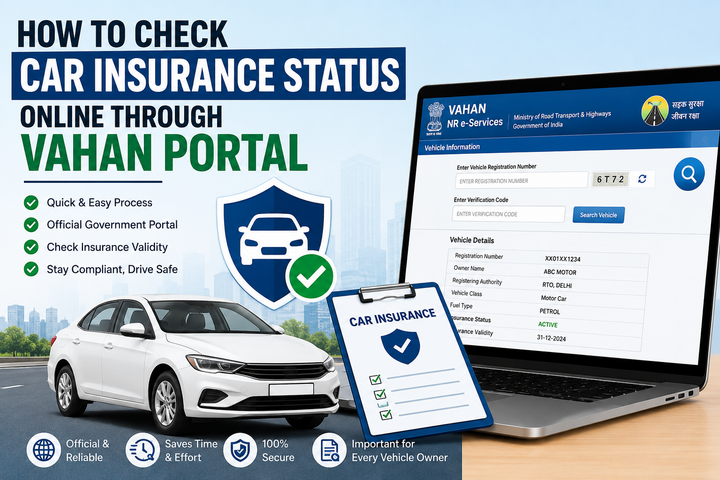
Car insurance is a mandatory requirement for every vehicle owner in India. Apart from protecting you financially against accidents, theft, and third-party liabilities, it also ensures compliance with the Motor Vehicles Act. However, many vehicle owners are unsure whether their insurance policy is still active, especially if the policy was purchased several years ago or renewed through an intermediary.
Fortunately, the Government of India's VAHAN Portal allows you to verify your vehicle's insurance status online within a few minutes. By entering your vehicle registration number, you can access important details related to your vehicle, including insurance information available in the database.
In this guide, you'll learn about that, how to check car insurance status online through VAHAN Portal, the information you'll need, and what to do if your insurance details are not displayed.
What Is the VAHAN Portal?
The VAHAN Portal is an online vehicle information system developed by the Ministry of Road Transport and Highways (MoRTH). It maintains a centralized database of registered vehicles across India and enables users to access essential vehicle-related information digitally.
The portal is widely used by vehicle owners, transport authorities, insurers, and law enforcement agencies to verify vehicle records. Depending on the available data, users can check details such as vehicle registration, registration validity, fuel type, vehicle class, and insurance status.
Why Should You Check Your Car Insurance Status?
Checking your insurance status regularly helps you avoid several problems.
An active insurance policy ensures that your vehicle remains legally compliant and financially protected. If your policy expires without your knowledge, you may face penalties, difficulties during claim settlement, and financial losses in the event of an accident.
Verifying your insurance status is especially useful before:
-
Renewing your car insurance policy.
-
Purchasing a used vehicle.
-
Selling your existing vehicle.
-
Long-distance travel.
-
Filing an insurance claim.
Regular checks also help you identify any discrepancies in your vehicle records at an early stage.
Steps to Check Car Insurance Status Through the VAHAN Portal
Checking your insurance details online is a straightforward process.
Step 1: Visit the Official VAHAN Portal
Open the official VAHAN vehicle information portal using your preferred web browser.
Step 2: Enter Your Vehicle Registration Number
Locate the vehicle information section and enter your complete vehicle registration number exactly as it appears on your Registration Certificate (RC).
Step 3: Complete the Security Verification
Enter the captcha code displayed on the screen to verify that you are a genuine user.
Step 4: Submit Your Request
Click the appropriate button to retrieve your vehicle details.
Step 5: View the Insurance Status
The portal will display the available information related to your vehicle. Depending on the records available, you may be able to view:
-
Insurance status
-
Insurance validity
-
Registration details
-
Vehicle owner information (where permitted)
-
Fuel type
-
Vehicle class
-
Registration date
-
Fitness details, where applicable
Always compare the displayed insurance information with your policy document to ensure everything is accurate.
Information Required to Check Insurance Status
One of the biggest advantages of the VAHAN Portal is that it requires minimal information.
Generally, you only need:
-
Vehicle registration number
-
Internet connection
-
A device such as a smartphone, tablet, or computer
No physical documents are required simply to check your vehicle's insurance status.
Benefits of Using the VAHAN Portal
The VAHAN Portal offers several advantages to vehicle owners.
Quick Online Verification
You can check your vehicle's insurance information within minutes without visiting an RTO or contacting your insurer.
Easy Access Anytime
The portal is accessible online, making it convenient to verify vehicle records whenever required.
Helps Avoid Policy Lapses
Regularly checking your insurance status helps ensure that you renew your policy before it expires, avoiding legal and financial complications.
Useful During Vehicle Purchase
If you're buying a second-hand car, verifying the insurance status through the VAHAN Portal can help confirm whether the vehicle has an active insurance policy.
Improves Transparency
The centralized database provides a convenient way to verify essential vehicle information and supports greater transparency in vehicle ownership records.
What If Your Insurance Details Are Not Available?
Sometimes, the insurance information may not appear on the portal. This can happen for several reasons, including:
-
The insurance policy was recently purchased or renewed.
-
Database updates are still in progress.
-
Incorrect registration number entered.
-
Technical issues affecting the portal.
-
Insurance information has not yet been synchronized.
If your insurance details are missing, first verify that you entered the correct registration number. If the issue continues, contact your insurance company or the concerned Regional Transport Office (RTO) for assistance.
Tips for Vehicle Owners
To make the most of the VAHAN Portal and avoid insurance-related issues, keep these tips in mind:
-
Renew your insurance policy before its expiry date.
-
Keep a copy of your insurance certificate, either digitally or in print.
-
Verify your insurance details after every renewal.
-
Ensure your vehicle registration records remain updated.
-
Cross-check information displayed on the portal with your policy documents.
These simple practices can help you avoid unexpected complications and ensure continuous insurance coverage.
Conclusion
The VAHAN Portal has made it easier than ever for vehicle owners to verify their car insurance status online. With just your vehicle registration number, you can quickly access important insurance and registration details without visiting an RTO or contacting multiple agencies.
Whether you're renewing your policy, purchasing a used vehicle, or simply checking your records, the VAHAN Portal provides a fast and convenient way to stay informed. By reviewing your insurance status regularly and renewing your policy on time, you can remain legally compliant and enjoy greater peace of mind every time you drive.