Daycare Management Software: What It Actually Fixes for Pet Boarding Businesses
Posted by Zubair Amjad
200 views
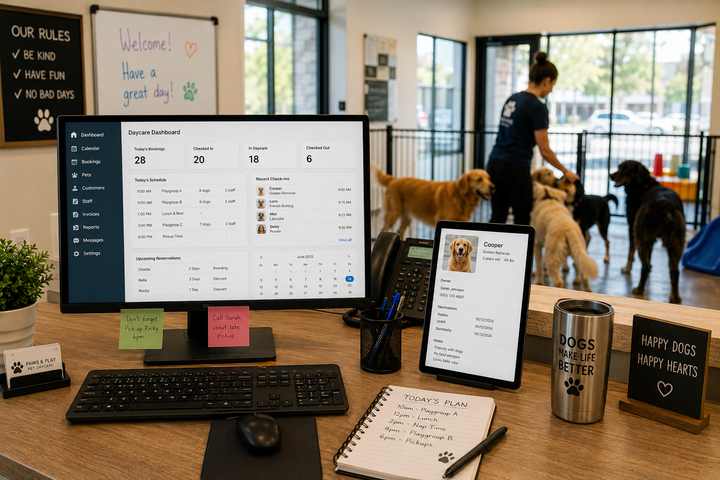
It's 7:45 AM and the phone won't stop ringing. Two families are checking in dogs at the front desk. A vaccination record is missing for one of them. Somewhere in the back, a staff member is trying to figure out who's supposed to walk the afternoon group. This is a normal morning for a lot of pet boarding businesses, and it's exactly the kind of chaos daycare management software is built to reduce.
If you run a dog daycare, boarding facility, or any pet care business that juggles bookings, staff, and daily animal care all at once, you already know how fast small gaps turn into big problems. This article walks through what daycare management software actually does, when it makes sense to use it, and what to look for before you commit to one.
What Is Daycare Management Software?
Daycare management software is a system that helps pet care businesses run their daily operations from one place. Instead of juggling a paper calendar, a separate invoicing tool, and a notebook full of pet notes, everything lives in one platform.
Most pet daycare software handles a mix of the following:
-
Online booking and reservations
-
Staff scheduling
-
Pet profiles and records
-
Check-in and check-out tracking
-
Payment processing and invoicing
-
Customer communication
Some tools focus on just one or two of these areas. Others, often called pet daycare management software or dog daycare management software, combine most of them into a single dashboard. The right fit depends on the size of your business and how much you're currently doing by hand.
Why Does It Matter for a Pet Boarding Business?
A boarding or daycare business runs on details. You're tracking which dogs get along, who needs medication at noon, whose owner is picking up early on Friday, and who still owes a balance from last month. Miss one of those details and you're dealing with an upset client or, worse, a safety issue.
Daycare business software matters because it takes those details out of your head and off scattered sticky notes. When booking, scheduling, and pet records live in one system, staff can find what they need in seconds instead of asking around or flipping through binders.
There's also a growth angle here. A facility running on spreadsheets and phone calls can only take so many bookings before something slips through the cracks. Software gives a business more room to grow without adding chaos at the same rate.
When Should a Business Use It?
Not every pet care business needs a full software platform on day one. A very small, appointment-only setup might get by with a shared calendar for a while. But there are clear signs it's time to look for something better.
You're probably ready for daycare management software if:
-
You're manually confirming bookings by text or phone
-
Staff scheduling is done on a whiteboard or shared spreadsheet
-
You've had a double-booking or missed reservation in the last few months
-
Pet records like vaccination proof or feeding instructions are scattered across paper forms and emails
-
Collecting payment involves chasing clients down after the fact
-
You're spending more time on admin work than on the animals
If two or three of these sound familiar, the software will likely pay for itself in time saved alone.
This isn't only a concern for established facilities, either. Owners who are still in the planning stage often ask when to bring software into the picture at all. If you're mapping out the early steps, this guide on starting a dog daycare business from zero is a useful starting point before you even get to choosing a platform, since the order you set things up in affects how smoothly software fits in later.
How Does Daycare Management Software Work?
Most platforms follow a similar structure, even if the interface looks different from one provider to the next.
-
Clients book online. Instead of calling, pet owners pick an open date through a booking page or app, based on real-time availability.
-
The system checks capacity. The software checks daycare capacity and existing reservations, so you don't accidentally overbook a day.
-
Pet and owner information is stored. Dog profiles include vaccination records, feeding instructions, medication notes, and behavior notes, so staff can reference them at check-in.
-
Staff get their schedule. Employee scheduling tools assign staff to shifts, groups, or specific tasks for the day.
-
Check-in and check-out are logged. Front desk staff mark pets in and out, which also feeds into attendance tracking and billing.
-
Payments happen automatically. Invoicing, deposits, and outstanding balances are tracked, and many systems support online payments directly.
-
Reports show how the business is doing. Business reporting tools pull together occupancy, revenue, and attendance data so owners can spot trends.
The exact steps vary, but the goal is the same: fewer manual tasks, fewer mistakes, and a clearer picture of what's happening in the business each day.
Choosing the Right Software: What Actually Matters
This is where most of the real decision-making happens, so it's worth slowing down here.
Online Booking and Reservations
Good pet daycare booking software should let clients see real availability and book without calling. Look for automatic booking confirmations and reminders, since these cut down on no-shows and last-minute phone tag. Daycare reservations should sync in real time so staff never see outdated availability.
Scheduling for Both Pets and Staff
Scheduling is really two jobs in one. There's the daycare calendar that tracks which pets are in the building on a given day, and there's staff scheduling that decides who's working which shift. A system that handles both, and lets you see them together saves a lot of back-and-forth.
Pet Profiles and Records
This is often the difference between a smooth day and a stressful one. Look for software that stores pet profiles with vaccination records, medication notes, feeding instructions, and behavior notes in a format your team can pull up quickly at check-in. Keeping this information current also matters for the animal's health, not just your paperwork. The American Veterinary Medical Association outlines core vaccination guidelines that many boarding facilities use as a baseline when setting their own intake requirements.
Customer Communication
Automated reminders and notifications keep clients informed without extra work on your end. This includes booking confirmations, pickup reminders, and updates if something changes with their pet's stay. Good client communication tools reduce phone calls and missed messages significantly.
Payment Processing
Online payments, automatic invoicing, and tracking of deposits and outstanding balances all matter here. A business that has to chase down payments after the fact is losing time it doesn't need to lose. Look for a system that lets clients pay at booking or at pickup without extra steps for your front desk.
Ease of Use
A powerful system that your staff finds confusing won't get used properly. During a trial or demo, have an actual staff member try the check-in process, not just the owner or manager. If it takes more than a minute or two to learn the basics, that's worth noting.
Reporting
Attendance tracking, occupancy management, and financial reporting help you understand the business beyond the day-to-day. Over time, this data tells you which days are consistently full, which services bring in the most revenue, and where you might be losing money.
Some providers, including K9 Sky's daycare management tools, build these features around the daily workflow of a boarding facility, from check-in through payment, so staff isn't switching between multiple apps to get through a shift.
Common Mistakes to Avoid
Even businesses that know they need software sometimes pick the wrong one, or set it up in a way that causes new problems.
Choosing based only on price. The cheapest plan often skips features you'll need within a few months, like automated reminders or proper staff scheduling. Compare what's actually included, not just the monthly cost.
Ignoring online booking. Some owners stick to phone bookings out of habit, even after buying software with a booking feature. This wastes the biggest time-saving benefit the tool offers.
Not checking scheduling features closely. A calendar that only tracks pet reservations, without staff scheduling, means you're still managing half the puzzle manually.
Using too many disconnected tools. Booking in one app, payments in another, and pet records in a spreadsheet defeats the purpose. Look for one system that covers most of your daily needs.
Skipping customer communication features. Automated confirmations and reminders reduce no-shows and last-minute questions. Businesses that skip this end up doing that communication manually anyway.
Not testing ease of use before buying. A demo that looks good on a sales call can still be confusing for staff during a busy morning. Test it with your actual team before signing a contract.
Practical Tips for Getting Started
-
Start with a list of your three biggest daily headaches, and check that any software you're considering solves those first.
-
Ask for a trial period and actually run a few real bookings through it before committing.
-
Get input from front-desk and daycare staff, not just management, since they'll use it the most.
-
Import existing pet records and vaccination documents before your first day using the new system, not during it.
-
Set up automated reminders and confirmations early, since this is often the fastest win in terms of time saved.
-
Review your reporting dashboard monthly, not just at tax time, to catch trends while they're still useful.
Conclusion
Daycare management software isn't about adding technology for its own sake. It's about giving a pet boarding business one place to handle bookings, staff schedules, pet records, and payments, instead of piecing it together from a calendar, a notebook, and a payment app that don't talk to each other.
The right choice depends on your specific pain points, whether that's missed bookings, disorganized staff schedules, or messy pet records. Look closely at booking, scheduling, pet profiles, communication, and payments before deciding, and test the system with the people who'll actually use it every day. Get those pieces right, and the busy mornings start looking a lot less chaotic.