How to Manage Electronics Store Inventory with Software
Posted by Marg Books
Filed in Music 19 views
To manage electronics store inventory with software, use a system that tracks every product by SKU, serial number or IMEI, and batch. It should update stock in real time with each sale or purchase, and connect directly to your billing and accounting records. This cuts stock mismatches, prevents dead stock, and keeps GST filing clean.
Why Electronics Inventory Is Harder Than Regular Retail
Selling mobiles, laptops, TVs, appliances, and accessories is not like selling groceries. Your stock has high unit values, short product lifecycles, warranty obligations, and frequent price changes. A single missing smartphone can wipe out the margin on dozens of sales.
Manual registers and basic spreadsheets break down quickly because they can't:
-
Track individual units by serial number or IMEI
-
Reflect stock changes instantly across counters or branches
-
Flag slow-moving or ageing inventory
-
Calculate GST correctly across different tax slabs
That's why most growing electronics retailers move to dedicated inventory software.
Step-by-Step: Managing Electronics Inventory with Software
1. Build a Clean Product Master
Start by entering every item with consistent details: name, brand, model, category, HSN code, GST rate, purchase price, and selling price. Standardized naming avoids duplicates such as "Samsung M14" and "M14 Samsung," which quietly distort stock counts.
2. Enable Serial Number and IMEI Tracking
For electronics, quantity alone is not enough. Serial or IMEI-level tracking tells you exactly which unit was bought, from whom, and sold to whom. This simplifies warranty claims, returns, and theft or loss investigations.
3. Set Reorder Levels and Stock Alerts
Fast-moving items like chargers, earphones, and power banks should have minimum stock thresholds. When quantity drops below the threshold, the software alerts you to reorder, so you avoid both stock-outs and over-buying.
4. Connect Inventory with Billing Software
Billing software and inventory should work as one system. When a bill is generated, stock should reduce automatically. When a purchase invoice is entered, stock should increase. Separate tools for billing and stock almost always lead to reconciliation headaches at month-end.
5. Use GST Billing Software for Compliance
In India, every invoice must carry the right GST details, such as GSTIN, HSN code, tax rate, and place of supply. Good GST billing software generates compliant invoices automatically and prepares data for GSTR-1 and GSTR-3B returns. It should also support e-invoicing and e-way bill generation where applicable, which matters for higher-value stock movement between locations.
6. Integrate Accounting Software
Inventory has direct financial impact. Closing stock affects profit calculation, while purchases and sales affect ledgers, payables, and receivables. When your accounting software shares data with inventory and billing, you get accurate profit and loss statements, outstanding reports, and balance sheets without double entry.
7. Manage Multiple Locations and Godowns
If you operate more than one showroom or warehouse, choose software that handles inter-branch stock transfers and shows stock location-wise. This prevents the common problem of one branch running out while another sits on surplus.
8. Review Reports Regularly
Don't just record data; use it. Key reports for electronics retailers include:
-
Stock ageing report: identifies items sitting too long, which matters as newer models launch
-
Fast and slow-moving item analysis: guides purchasing decisions
-
Item-wise profit report: shows which products truly earn margin
-
Supplier-wise purchase report: helps negotiate better terms
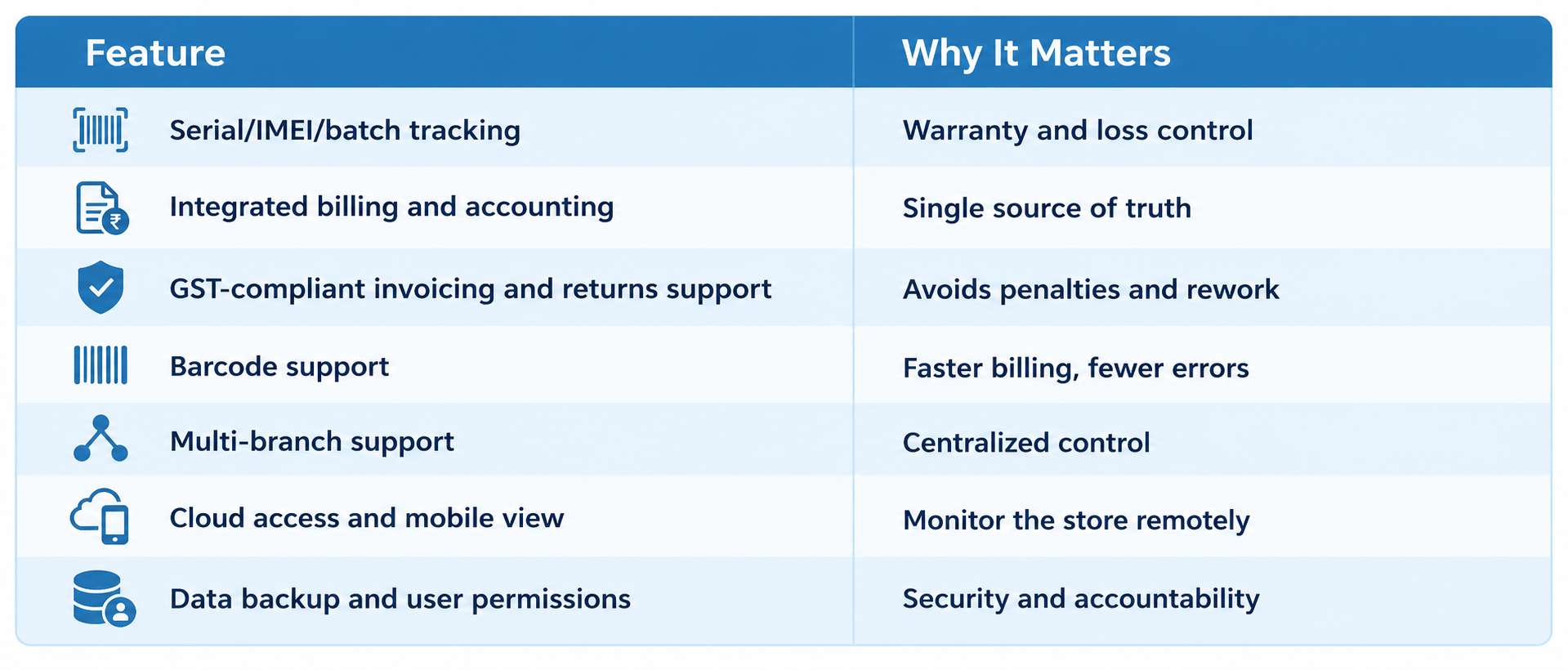
Features to Look for in Inventory Software
When comparing options, check for the following:
Where MargBooks Fits In
Among the options available to Indian retailers, MargBooks is worth evaluating if you want inventory, billing, and accounting in one cloud-based platform. It is designed around Indian business needs, including GST-compliant invoicing, inventory tracking, and accounting in a single system. This reduces the need to juggle separate tools for stock, bills, and books.
For an electronics store, the practical benefit of a unified platform is simple: a sale updates stock, GST data, and ledgers together. Cloud access also means owners can check stock and sales from anywhere. As with any software, test it against your own workflow, such as serial tracking needs and branch count, through a demo or trial before committing.
Common Mistakes to Avoid
-
Skipping the initial data cleanup. Importing messy item data only carries old problems into new software.
-
Using separate tools for billing and stock. This creates mismatches that take hours to reconcile.
-
Ignoring staff training. Even the best software fails if billing staff bypass stock entry.
-
Not doing periodic physical stock audits. Software shows what should be on the shelf; occasional physical counts confirm it.
-
Overlooking GST rate updates. Make sure your GST billing software is updated whenever tax rates or rules change.
Conclusion
Managing electronics inventory well comes down to visibility and consistency. Know what you have, where it is, what it cost, and how fast it sells. The right combination of inventory tracking, billing software, GST compliance, and accounting software turns stock from a daily worry into a controlled, profitable asset.
Start by cleaning your product data, choose software that fits your store's scale, and train your team to use it consistently. Whether you pick MargBooks or another solution, shortlist two or three options, run a trial, and choose the one that matches how your store actually operates.
Frequently Asked Questions
What is the best way to track electronics inventory?
Use inventory software with serial number or IMEI tracking, real-time stock updates, and integration with billing and accounting.
Do I need separate billing software and accounting software?
Not necessarily. An integrated platform that handles both avoids duplicate entry and keeps financial data consistent.
Why is GST billing software important for electronics stores?
Electronics fall under different GST slabs, and invoices must carry accurate HSN codes and tax details. GST billing software automates this and simplifies return filing.
Can inventory software help reduce dead stock?
Yes. Stock ageing and movement reports show which products aren't selling, so you can run offers or stop reordering them.
Is cloud-based inventory software safe?
Reputable platforms offer encrypted storage, regular backups, and role-based access. Always verify these features before choosing.